You can use the Pause SSML tag to insert a short silence in your audio. This helps create a natural break in speech and can also be useful when you want to add background music or a small pause between sentences.
Adding a Pause using SSML
Step 1: Enter the text in the editor and select your preferred voice.
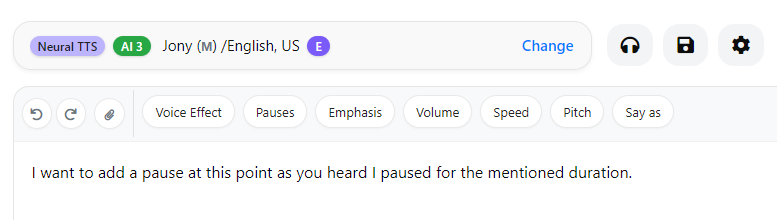
Step 2: Place your cursor at the position where you want to insert the pause.

Step 3: In the top menu bar, click on the Pause dropdown. Select the desired pause duration and click Submit.
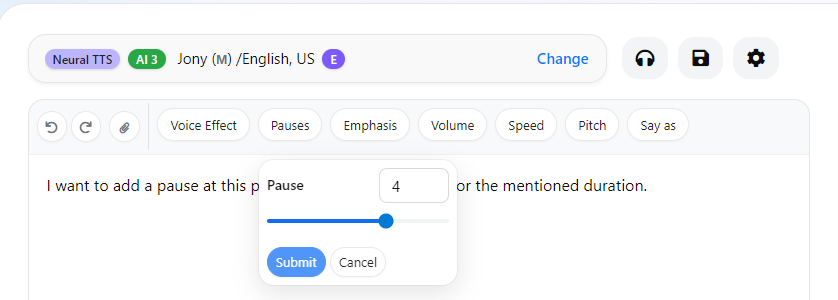
This will insert the pause SSML tag at the selected position in your text.
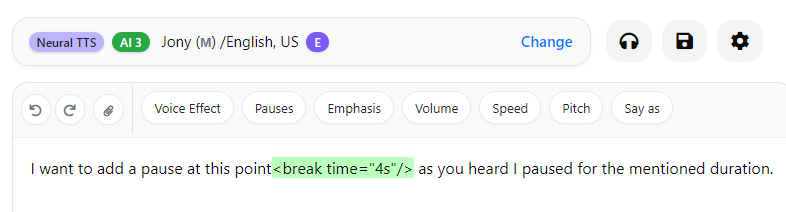
Step 4: Click Convert to Speech to generate the audio.

Here is the final audio result.
In a similar way, you can add pause tags at multiple positions by placing the cursor where needed and applying the SSML from the Pause dropdown.
Alternatively, you can insert the pause SSML tag directly into the text by typing or copy-pasting it and setting the duration manually. You can also use Custom Pauses to define the exact pause length as required .